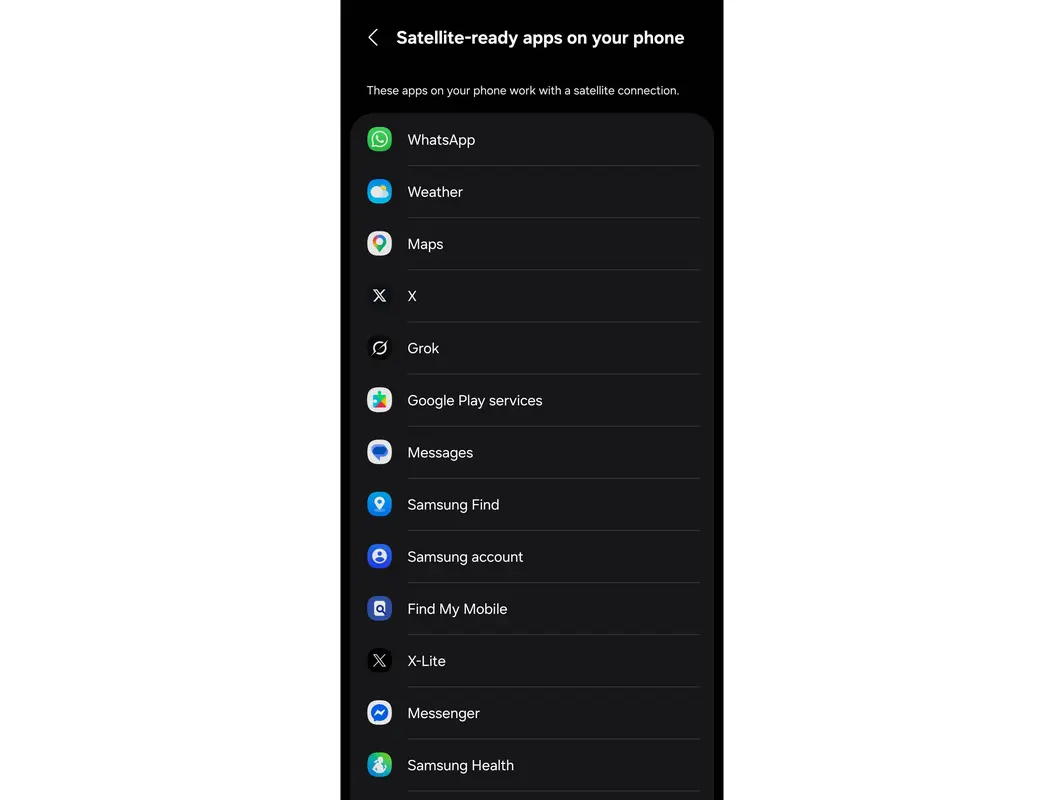
Samsung has quietly added a new feature that shows which apps on your phone can work with satellite connectivity. A recent screenshot shared on X reveals that compatible devices now display a "satellite-ready" apps list directly in the Settings menu.
How to Find Satellite-Ready Apps on Samsung Phones
The feature is tucked away in the Connections section of your phone's settings. To access it, navigate to Settings > Connections > Satellite networks. Once there, you'll see a curated list of apps installed on your device that support satellite functionality.
It's important to understand that this isn't a comprehensive directory of every satellite-capable app available. Instead, it only shows apps from your current installation that can potentially use satellite connectivity when needed.
What Actually Works Depends on Your Carrier
Before you get excited about using Google Maps or other data-heavy apps via satellite, there's a catch. The actual functionality available depends entirely on your mobile carrier's satellite service.
T-Mobile's T-Satellite service operates similarly to regular cellular data, just routed through satellites instead of cell towers. This means you can potentially use more apps with full functionality. However, other carriers like Verizon offer more limited satellite services that only support emergency SOS and basic text messaging.
Samsung's list represents the best-case scenario for app compatibility, not a guarantee of what will actually work in your specific situation. Your carrier's satellite service tier ultimately determines which features remain accessible when you're off the grid.
Satellite Connectivity on Android Devices
Satellite connectivity has become an increasingly important feature for modern smartphones. While initially limited to emergency situations, carriers are expanding what users can do via satellite connections.
This new settings menu gives Samsung users better visibility into their device's satellite capabilities. It helps you understand which apps might remain functional when traditional cellular networks aren't available.